Search This Blog

Showing posts with label Electronics/PC/ Etc. Show all posts

Thursday, August 15, 2024

Air 💨 Duster

💨 Electric Air Duster  💨
https://64.media.tumblr.com/c4300b4464f66b3fb7c4a0302e378822/73782a9bdc0b2daf-4e/s1280x1920/a3c489c61225395800cc155c8206c82903740ab4.jpg
For: Dusting, Drying, Inflating, Blowing, Car Detailing, Computer Maintenance 
💨 SAY HELLO TO UNLIMITED COMPRESSED AIR – Dust, dry, inflate, and blow with an electric air duster – the XPOWER A-2 Airrow Pro!
💨 ADVANCED FEATURES – Powerful 90 CFM airflow, airflow with multiple speeds, rugged and lightweight ABS housing, a washable filter, and thermal protection
💨 MAXIMUM VERSATILITY – Multiple nozzle and brush options included.
💨 ECO-FRIENDLY–Unlike canned air, the A-2 won’t expel toxic inhalants such as dangerous fluorocarbons and other deadly propellants.
💨 SAFETY & SERVICE STANDARDS – ETL / CETL safety certified and comes with a 1-year limited warranty. XPOWER’s California-based customer service team offers comprehensive support, assuring a first-class customer experience.
👇  📺  👇
https://64.media.tumblr.com/3094ba99a28bf03de34f8dacdfc2dd2c/73782a9bdc0b2daf-73/s1280x1920/c5f0bbfcdf4994280ae6ff7bdbf6aa8a80e5e44f.jpghttps://64.media.tumblr.com/356decc82402d54db4ee2890488da877/73782a9bdc0b2daf-50/s1280x1920/4f41b461c3b2303c2ed4898965bedd56ff2a9868.jpg
XPOWER A-2S Electric Air Duster Review - Never Buy Cans of Compressed Air Again!
0:00 Intro
0:21 Problem with cordless dusters
1:25 XPower Pro Duster Design
2:36 My persistent PC dust problem
3:33 Dust prevention
4:01 Why ultra fine fan filters are important
4:45 Cleaning prep
5:29 Cleaning with the cyber duster
7:17 Can of compressed air vs A2-S duster
8:15 Closing comments

Overall, cleaning my PC with the XPower A2-S cyber duster was a much more convenient and satisfying experience than with cleaning with compressed air. I find cans of compressed air to be quite annoying to use because you need to hold the can straight in order to prevent its dangerous liquid from being expelled on your delicate components. The whole operation felt risky, not to mention that the can would get extremely cold, causing me to wait for it to warm up and preventing me from cleaning my PC in a fast and efficient manner. The Xpower cyber duster is a worthy buy it for life investment thanks to how durable and reliable it is. With the Xpower duster, not only you are getting an equally, if not not more powerful and reliable air blower, you are stopping unnecessary waste of disposable compressed air cans that go into a landfill, and who knows, maybe this duster can be handed down to the next generation or shared with friends to further prevent waste and create a more sustainable future.
https://64.media.tumblr.com/44ac0ee9a4307355e1e69163c2170e2b/73782a9bdc0b2daf-12/s640x960/5a86dac09cc0e2d358f27a1b15edd5617293adfa.jpghttps://64.media.tumblr.com/4e30c16bb2c0aaeb0a2f1012d48a9a2f/73782a9bdc0b2daf-cf/s400x600/0118be8dc5a6b7a4f5731a5aae47d45e715fb427.jpg
XPOWER A-2B & A-2S Cyber Duster 
Multipurpose Powered Air Duster, Blower
The XPOWER A-2S/A-2B Cyber Duster is a new generation Multipurpose Powered Air Duster, Blower that packs a great deal of power in a lightweight, compact package. The Cyber Duster is designed for frequent and heavy-duty use in corporate, IT, and home environments. This tool not only replaces canned air dusters, it also provides you with the versatility to dust, pump air, and dry.   The Cyber Duster eliminates dangerous fluorocarbons and other deadly propellants produced by compressed gas dusters, as well as saving you money on canned air over its lifetime. This is a one-time investment so you will never need to buy canned air ever again.  The A-2B is a rechargeable battery-operated model and the A-2S is a plug-in corded model.
👇 💨 👇
💨  💨 💨
https://64.media.tumblr.com/f6f182612e4d3b38504388fdf70a2166/73782a9bdc0b2daf-67/s1280x1920/cc57bbf7e5e232794a965c23a5ad3bbd0cf10040.jpg
👉  Electric Air Duster Review   👈
 💨  💨  💨


Saturday, March 18, 2023

Best Sound Bars 🔊 4 Home Theater System🔉 🔊

🔉 Best Compact Sound Bars 🔊
For Your Home Theater System
December 16, 2021
Image from Digital Art
Soundbars vs Surround Sound Speakers:
Which is Best for You?
👇 🎼 👇
RS Recommends: 
The Best Compact Sound Bars to Upgrade Your Home Theater System. Don't let a lack of space stop you from experiencing excellent audio quality
When you hear the term “home theater audio system,” it’s easy to only think about big 5.1 surround sound speakers, but that’s not always the case. Compact sound bars are a major improvement over the speakers built into your TV, and can fit neatly under it.
The major problem with TV speakers is that modern 4K TVs are designed to be as thin as possible, which means there’s not a lot of space for audio equipment. Compact sound bars may be short, but they’re still taller and wider than the speaker space inside your TV. What that means: these little “bars” help create a larger, more immersive sound-space than just using built-in TV speakers alone.
Better still, well-known audio companies and TV brands have begun making their own compact sound bars, so you’re not sacrificing audio quality if you get one. As a person who was skeptical about sound bars until I tried one, I can attest to the big difference they make in your home theater experience, even in a small living room or studio apartment.

What Are the Best Compact Sound Bars?
There are many factors to consider when choosing the right compact sound bar (or portable sound bar) for you; below are the most important ones, which we considered while we were researching this list.
👂
Size: 
We’re defining “compact” as sound bars under 30 inches long. These sound bars won’t take up a lot of space, and can be mounted on the wall under your TV set or placed on top of an entertainment unit or shelf.
👂
Connectivity: 
Sound bars connect to your TV by getting plugged into ports like optical audio, HDMI, and RCA (red and white). Some sound bars have multiple ports, which allow you to use them with several devices at once, and other sound bars support Bluetooth, so you can stream audio to them wirelessly.
👂
Smart Features: 
While you should get a sound bar to improve the audio quality of your home theater system, we’ve also chosen one that can be used as a smart-home hub.
👂
Upgradability:  
All of the compact sound bars we’re recommending will sound great on their own, but some can be part of a larger audio system you can build over time.
🔊
Vizio SB2920-C6
EASY TO INSTALL
VIZIO has become a popular TV company over the past few years, but its compact sound bar is no slouch. It measures 29 inches long, which makes it the largest compact sound bar we’re recommending, but it’s still relatively small compared to setting up an entire speaker system.
The SB2920-C6 has an optical, Aux (3.5mm), coaxial, and RCA inputs, plus an output for a subwoofer. VIZIO includes several cables with the sound bar, so you can connect it to your TV (and other devices) right out of the box. The only upgrade you can make to this sound bar is adding a subwoofer, so you can’t use it to build up a surround sound system over time.
This sound bar supports high-resolution audio formats like Dolbys DTS Studio Sound, DTS TruVolume, and DTS TruSurround when you use an optical cable. You won’t get real surround sound audio out of this sound bar, but it will mix 5.1 audio into stereo.
VIZIO covers the basics with the SB2920-C6, but it doesn’t have any smart features, and its upgradability is somewhat limited. Still, it’ll be a big improvement over your TV’s built-in speakers, and deserves more than a brief look.

🔊
Bose TV Speaker Small Sound Bar
MOST COMPACT

The Bose TV Speaker Small Sound Bar delivers big, booming sound in a sleek, compact package. Paired with your TV, the portable sound bar creates a louder, more immersive listening experience than through your TV speakers alone. You’ll hear every rip and rumble from your favorite action film, with deeper bass and loud, room-filling sound. Music and effects are brought to life in vibrant detail, while Bose’s “dialogue mode” pulls out every word and expression from movies or commentary, to ensure that conversations sound crisp and clean.
The surprisingly powerful speakers amplify sound throughout the room, making this great for music listening too. Pair the sound bar to your phone via Bluetooth to soundtrack your next party, or to set the mood for when you want to relax with a good album in rich, audiophile quality. Press the “bass” button on the included remote to turn up the beats for extra oomph.
At 23.4 x 2.2 x 4 inches, this is the smallest Bose sound bar, and one of the most portable sound bars available overall. The TV Speaker’s light weight (just over seven pounds) makes it easy to mount on the wall or position on an entertainment unit or counter  (you can add mounting hardware for an extra $40).
🔊
Sonos Beam
BEST OVERALL
I used the Sonos Beam as my home theater audio system for almost a year, and it’s still the sound bar I recommend to my friends and family.
It’s 25.6 inches long, which puts it in the middle of the pack in terms of size, but it’s fully loaded with impressive features. The Beam only has one port — HDMI — plus an HDMI to optical audio converter it bundles in the box. This may seem strange at first, but HDMI and optical audio are the most widely used standards for stereo receivers and TVs.
Most sound bars have other ports to allow you to upgrade your system over time, and connect lots of devices to them at once. The Beam has all of those features, but Sonos opted to go wireless instead. This sound bar supports Bluetooth and AirPlay 2, an Apple-developed wireless audio standard that allows you stream higher resolution music from your iPhone, iPad, Mac, or Apple TV.
You can create a full 5.1 surround sound system by pairing the Beam with a Sonos SUB or Sonos Onespeakers. The Beam, Sub, and One speakers all need to be connected to an outlet for power, but connect to one another wirelessly.
The Sonos Beam is a smart sound bar, and can be set up to work with both Amazon’s Alexa and the Google Assistant. Once it’s configured, you can control the Sonos Beam with your voice. Voice commands can be used to play music from different streaming services, change the Beam’s volume, or control smart-home accessories.
These technical features are all great, but it’s the Sonos Beam’s performance that really stands out. In my experience, the Beam does a great job when listening to music, watching movies and TV shows, or playing video games. It held its own in scenes or game sequences where there was a lot going on, and dialogue was never drowned out by background effects. I was particularly impressed with how the Beam handled bass.
It’s no surprise that the most technically-advanced compact sound bar in our guide comes from one of the pioneers of modern audio tech, but the Sonos Beam delivers on all fronts. Buy Sonos Beam $369.00 
 
👇   🔉 🎼 🔊   👇
🔊 Best Soundbars for Your TV and Home Theater
🔉 👆👂 🔊
RS Recommends 

Thursday, December 16, 2021

Christmas Lights✨Interfering with Wi-Fi

❄ Your Christmas Lights ❄
https://66.media.tumblr.com/7ed60e329592595d3194a472310ee3fa/tumblr_pjzu917yh11u16ta8o6_1280.gif
Could be Interfering
With your Wi-Fi Connection
https://66.media.tumblr.com/0c5549897b733129f9a66b696a670a75/tumblr_pjzv3rRjIJ1tkqjspo2_500.gif
It's the most wonderful time of the year.
ANDREW SMITH -  DEC 2015
This article was written by Andrew Smith from The Open University, and was originally published by The Conversation.
                         
Ofcom, the UK’s independent telephony regulator, has just released a Wi-Fi checker app for your smart phone. At the same time, it warned in its press release that your Christmas tree fairy lights could affect the quality of your Wi-Fi connection.

Before the terrible jokes start and we all declare that this is a fit of "Bah Humbug!" from the telephone regulator, the warning is correct – your fairy lights could indeed be a Wi-Fi downer. But then so could many other devices. Ultimately, it is a matter of how much of a problem they actually cause. 
The science behind the warning
The whole press release describes how microwave ovens, fluorescent lights and other devices could also play havoc with your wireless connection. 

Casting your minds back to science at school, you may recall your teacher describing the electromagnetic spectrum. The electromagnetic spectrum covers radio waves, microwaves, visible light and radiation. It is around us all the time. Our phones, radios, televisions and desk lights all depend on this principle from physical science.
https://62e528761d0685343e1c-f3d1b99a743ffa4142d9d7f1978d9686.ssl.cf2.rackcdn.com/files/103872/width668/image-20151201-18818-1fj7q5z.jpg
Wireless networks typically work on the 2.4 Gigahertz microwave radio spectrum. The term Hertz means the number of waves per second, so 1 Hertz is one wavelength per second. Your FM radio station may use 100 Megahertz, or 100,000,000 waves per second, while 2.4 Gigahertz, used by wireless, is 2,400,000,000 waves per second, making the radio waves used by Wi-Fi considerably shorter. Essentially, this means that they are 'weaker' than FM radio waves – as they require greater power to cover the same distance. 

Your wireless router also uses considerably less power than a public FM transmitter. We expect the maximum reach of a domestic Wi-Fi signal to be 100 metres, while FM in the right conditions can easily be obtained at up to 10km and beyond. (There are also public forms of Wi-Fi called WiMAX, which can work in larger areas, but it is important to note that this is unrelated to the Ofcom press release.) 

Because your wireless network is much less powerful than a big FM transmitter and its waves are weaker, where you place the router and what you have in your house will have an impact. Home electrics, microwaves, steel girders, concrete cladding and foil insulation all can have an effect. Older properties with their thicker walls make a difference, too, as the lower-powered, high frequency Wi-Fi radio waves struggle to penetrate them. 

But while many different factors can dull your Wi-Fi signal, I can’t recall anyone yet getting miffed about their festive laptop watching of Dr Who being affected as soon as the Christmas lights go on. 
What should you do?
But it is possible. Most fairy lights have unshielded wires, which means there’s no radio frequency insulation to protect radio-based devices from the electromagnetic effects of the power cables trailing around your tree. 

Nevertheless, it would take a considerable volume of lights to create enough interference to seriously degrade your Wi-Fi network. In fact, you would have to be lighting up your tree like a small sun – which perhaps some of you are planning.
Do consider downloading the Wi-Fi checker app offered by Ofcom, however – it may help you discover that it’s the service provided by your phone company, rather than the fairy lights, that’s to blame for all that endless buffering. 

You should also think about where you place your wireless router in your home. Hiding it under a tin can inside a cupboard insulated with tin foil will ruin your Facebook fun. As will decorating your wireless device with holly and fairy lights. 

There are domestic devices that will degrade the wireless signal – although it’s not often you’ll be running your microwave 24 hours a day – but don’t rush to throw away your fairy lights just yet. Christmas is coming, after all. 
https://66.media.tumblr.com/5c86dc4123a51b8a3dd03303d35195bc/tumblr_pjzv3rRjIJ1tkqjspo4_500.gif
https://66.media.tumblr.com/74e8f160b7ce2058eab4a8dc171dea97/tumblr_pjzv3rRjIJ1tkqjspo3_500.gif
https://66.media.tumblr.com/98d390f68f7ae9ca9c6b1a449625b1b3/tumblr_pjzu917yh11u16ta8o4_500.gifhttps://66.media.tumblr.com/98d390f68f7ae9ca9c6b1a449625b1b3/tumblr_pjzu917yh11u16ta8o4_500.gif

Friday, March 12, 2021

Text 📲From Your 💻Computer

📲 Text From Your Computer 💻
https://64.media.tumblr.com/a2074efb798d5f965dfa1709bf2ab6bc/3090829244619e26-9b/s1280x1920/ecd0bde4e6469098844ac165857b5901adcb767d.png
https://64.media.tumblr.com/de676d64b3ec3a26b1f660c5ec4556d2/3090829244619e26-08/s1280x1920/bcd75d40cb0f23f466730717bcec30de70185104.png
How to Text From Your Computer
For Your Android Text Messages
👇 📽️ 👇
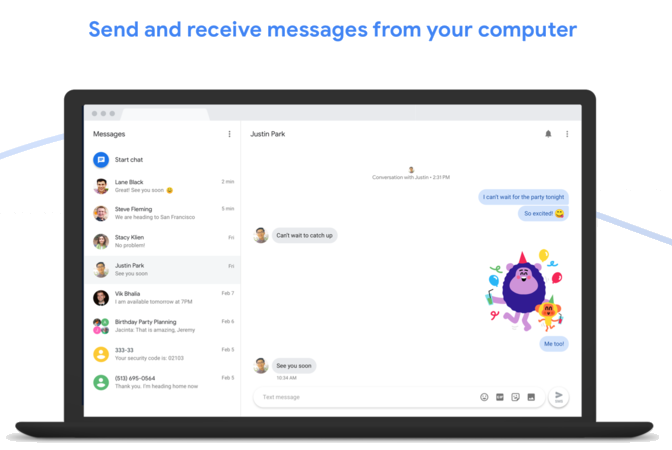
Google just updated Android Messages for web to allow you to text from your computer or even other devices like tablets as long as you have access to a browser! 
Previously, you had to use complicated workarounds like Push Bullet to even get something close to what Apple has on the iPhone with iMessage. 
Now Android users have a native text message solution on the computer, and yes, it does include SMS.
How to Send/Receive Text Messages
from Computer
It's helpful to know how to use your computer to send text messages for those times when a smartphone is just inconvenient. Learn how to send SMS messages from a computer / PC using a mobile phone.
👇 📽️ 👇
✔ Messages for Web : https://bit.ly/2M5VRXL
✔ Messages app : http://bit.do/eLTTH

How to Text Phone Numbers
 From Your Computer
Last updated March 12, 2020   

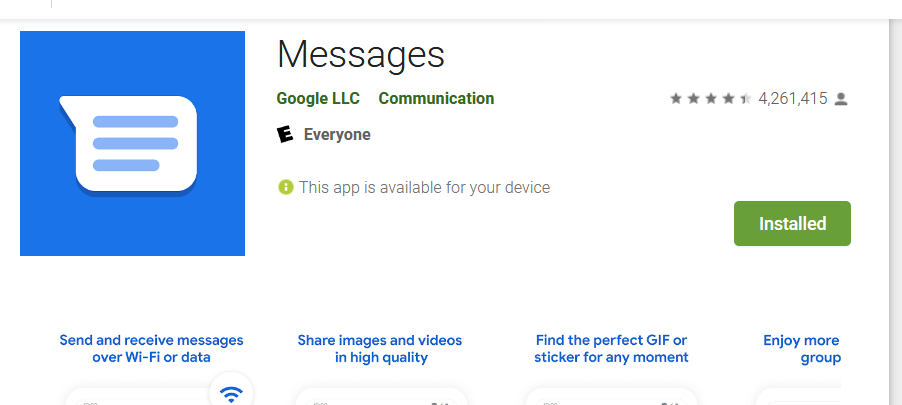
Meet Messages, Google’s official app for texting (SMS, MMS) and chat (RCS). With Messages, you can communicate with anyone in any location with the reliability of texting and the richness of chat.  Connect with friends and family through group messages, shared photos, videos, GIFs, emoji, and more. Intuitive and modern, Messages makes conversations easy, expressive, and fun.

Richer messaging with chat features (RCS)
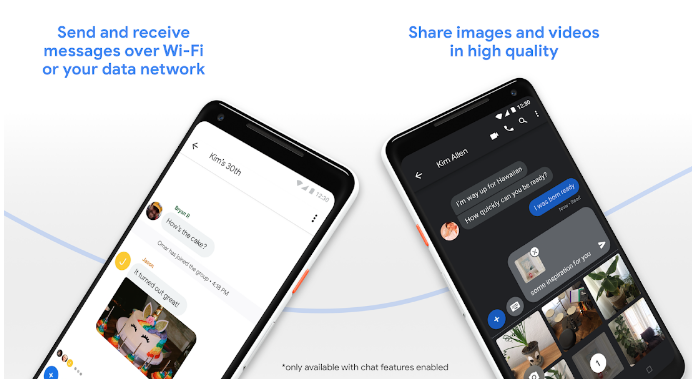
In supported conversations, you can send and receive messages over Wi-Fi or your data network, share images and videos in high quaity, see when friends are typing or when they've read your message, and more.

Simple, intuitive, and comfortable design
Instant notifications, smart replies, and a modern design make communicating easy, fast, and convenient. You can send and receive texts on your mobile phone, computer or tablet. And with dark mode, you can use Messages comfortably in low-light situations..

Easy sharing
Easily take pictures and videos directly from the in-app camera or share from the media gallery. You can also send audio messages, share your location or contacts, and send and receive payments with Google Pay.

Express yourself
Communicate with friends, family, and groups in more fun and expressive ways using emojis, GIFs, and stickers.

Powerful search
Find more shared content in your conversations: tap on the search icon and select a specific contact to see your messaging history with them and all your shared text messages, images, videos, places, and links.

Safer conversations
With real-time spam detection, Messages helps prevent spam from entering your inbox so chatting is easier and safer.

Messages is supported on devices running Android™ 5.0 Lollipop and above.

https://messages.google.com/web/authentication
 
Is it possible to text someone from a computer?

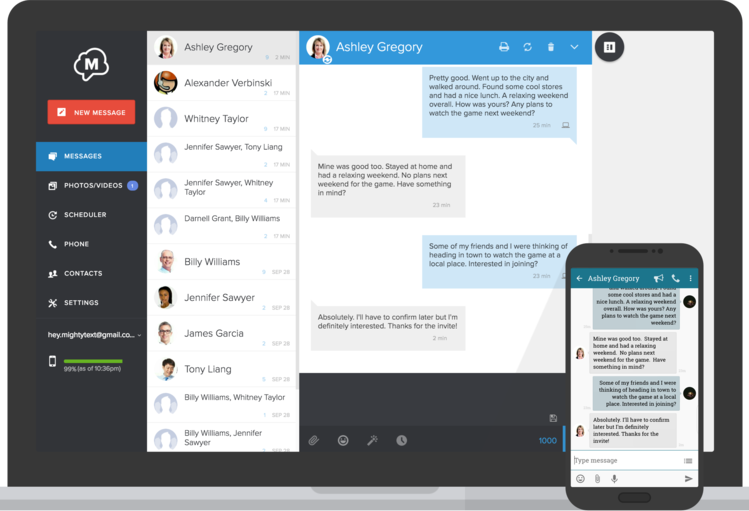
It’s more than possible to text someone from a computer. But you’ll need the right tools to get the job done. Until recently, the only way to send text messages was on your phone. The big considerations for both consumer and business text messaging options are convenience and ease of use.

When we think of text messaging, we typically think of mobile phones. For consumers, that makes sense. However, many businesses and solo entrepreneurs want to text from their laptop or desktop computer. In fact, 22% of people already use a laptop or desktop to send texts.

For a business, it’s distracting to have to always pick up the phone to send a text message. Having that capability on a desktop saves time.
https://64.media.tumblr.com/96844937586490569ac6e97c81ec45bd/f92a3a91c1a78cfa-91/s640x960/2a87ca5fa67c95440d0c716e41495659da3ec299.png
How to Text Someone from Your Computer
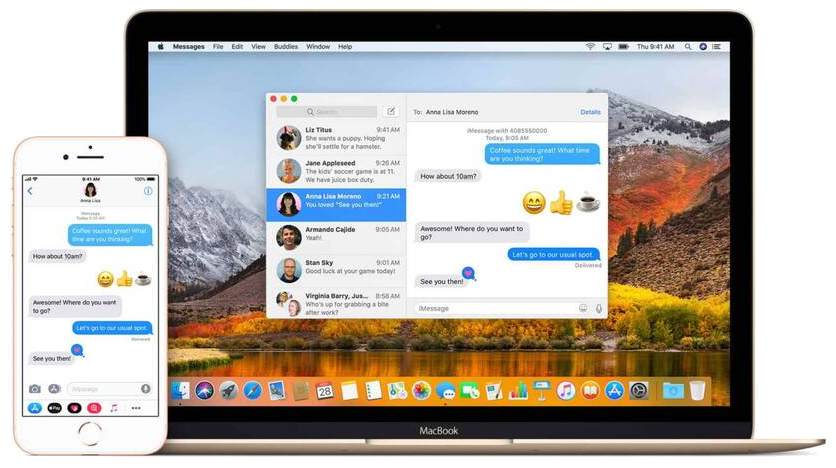
Send Texts from Your Mac Using iMessage


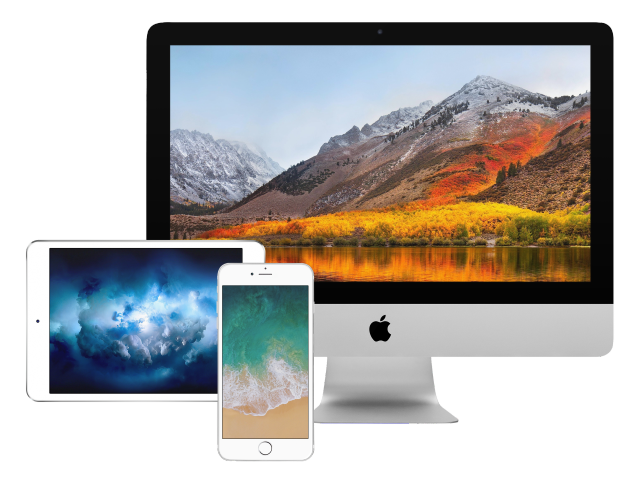
If you’re a consumer with an iPhone or an iOS device, you’ve got access to Apple’s iMessage platform. iMessage isn’t just for iPhones. It works great on all of your iOS devices.
How to Send Texts Using iMessage
  1.     Log in to your iCloud using your Apple ID.
  2.     Select a device to connect to.
  3.     Your device will automatically sync all messages.
  4.     After syncing, you can send messages.
Keep in mind, all  iMessage  appear blue when they’re sent to other iOS devices. If you send a message to someone who doesn’t have an iPhone, the message will appear green.
Green messages actually get delivered as a regular text message. With regular text messages, remember that messaging and data rates may apply. It all depends on your carrier.
Tumblr: Image 
How to Send a Text From Your Computer
 to iOS or Android
Need to message someone but your phone isn't handy? Try these tips
by Molly McLaughlin  March 04, 2021  reviewed by  Christine Baker
This article explains how to send a text from a computer to an iOS or Android device. Instructions apply to macOS, Windows, iOS, and Android. Additional information covers how to sync texts between your smartphone, web browser, and desktop PC using Pushbullet.
https://64.media.tumblr.com/806a7281cb291554eb2648ad9cd27b0c/f92a3a91c1a78cfa-cb/s1280x1920/63cee717726e1321e05901c039b9b018f231a591.jpg
Send Texts from a Desktop using Android Messages and Text from the Web
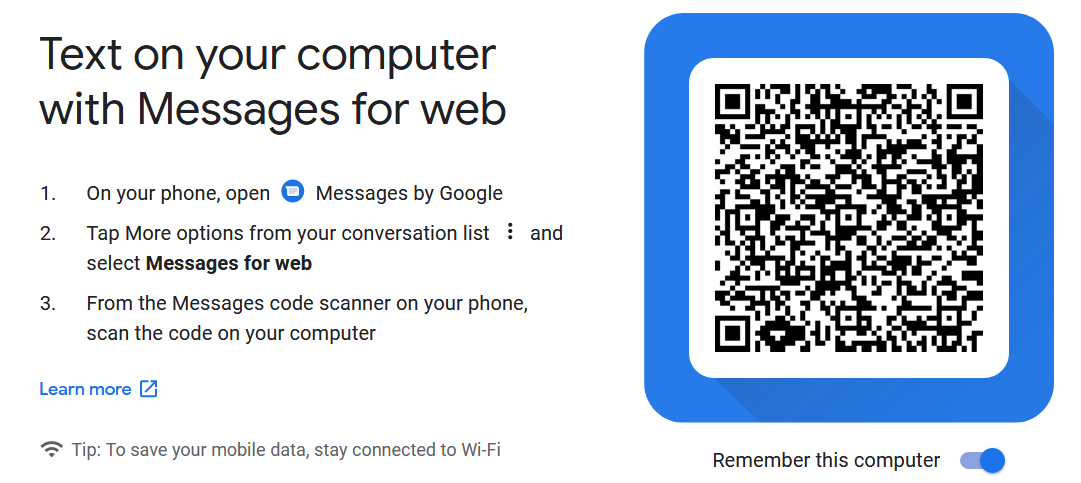
For consumers who use an Android phone, Google has a Text from the Web desktop solution. It allows android devices to send text messages from a desktop computer or mobile device.
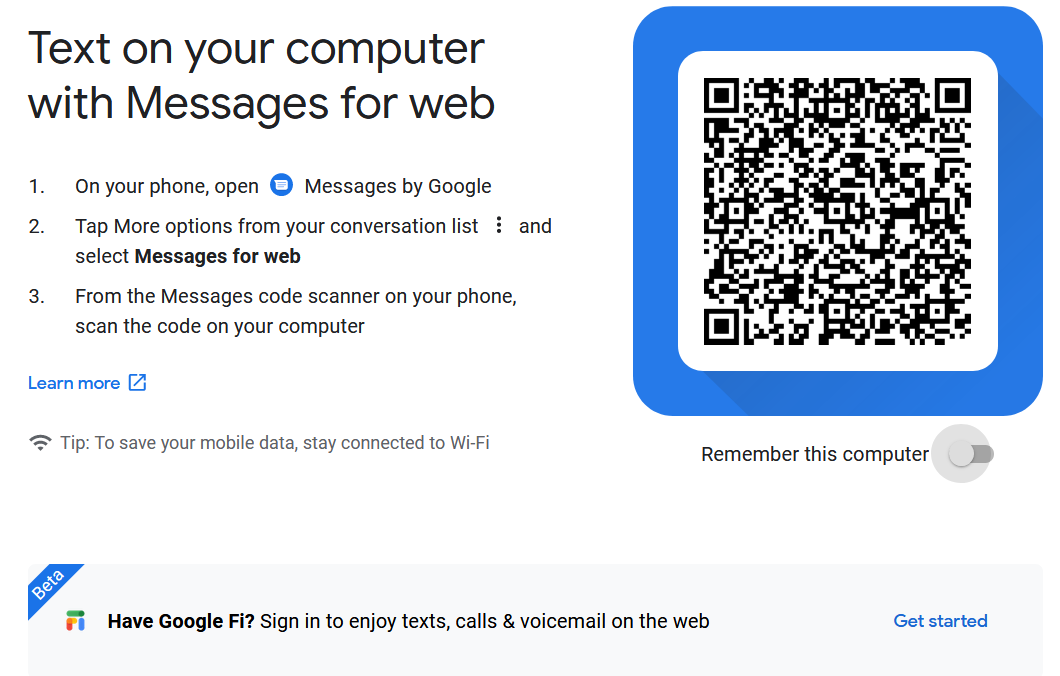
To use the Text from the Web feature, you need Android Messages. Android messages is typically the main text messaging app on your Android device. If you have the latest version of Android Messages, simply login to messages.andriod.com  from your computer.


You can use any desktop computer to send messages. Just scan the QR code. After that, you’re ready to send and receive text messages on your desktop.
These Browsers Work Best for Android Messages:
  •     Chrome
  •     Firefox
  •     Microsoft Edge
  •     Safari
Additionally, you can select “Remember this Computer”. This option saves you from scanning the QR code multiple times. It’s helpful if you use the same computer or desktop consistently.

Send a Text Using Your Email
It’s surprisingly easy to send a text using an email address. If you know the phone number and cellphone provider this is easy. All you have to do is combine the 10-digit phone number with a carrier domain.
Example: using (123) 456-7890 the email address you would text to from your desktop would look like: 1234567890@vtext.com.
To send a text message from your email type your text into the email body, then press send. If you get a reply to your text, the message goes straight to your email's inbox. Note: Longer messages will get broken up into multiple text messages, and standard text message rates apply to recipients. This is because messages get sent as regular texts.

Carrier Desktop Text Message Domains
  •     AT&T: @text.att.net
  •     Sprint: @messaging.sprintpcs.com
  •     T-Mobile: @tmomail.net
  •     Verizon: @vtext.com (or @vzwpix.com for photos and video)
Text From Your Computer Using Your Wireless Provider
Some wireless service providers like Verizon and AT&T provide their own options. They allow you to message other in-network users directly from their own carrier websites.

If you have Verizon, you can sign in to your My Verizon Account. There, you can send and receive texts, photos, and videos from other Verizon users. Verizon users can also download a desktop application for their computers through My Verizon.
Send a Text from Your Computer Using a Business Text Messaging Platform or Application
Texting customers and clients using your personal cell phone is a liability. It can also become a hassle. These problems only get bigger when you have multiple employees.
Text messaging beats email and voice when it comes to customers. However, most consumer text messaging solutions don’t typically scale. Plus, some don’t support more advanced business needs like managing contact lists.
Ultimately, a good text messaging platform allows businesses and their employees to send text messages from any device including desktop.
There are a lot of business text messaging platforms. Most allow you to send text messages from your desktop. What you’ll really want to consider is time-savings and efficiency before committing to a platform.
Most of these solutions, like SnapDesk, also allow you to schedule text messages to send in advance.
Scheduling works great for things like appointment reminders, promotions, service updates, and general SMS marketing.
More advanced platforms support text messaging features like templates, tags, group texting and various forms of automation that support bulk SMS text sends.
📱 📲 💻 ⌨️ 🖥 👨‍💻 📺  📰
📲 How To Organize Your Phone & Clean Out Your Storage ☎️
          📲 Five things that could be slowing you down.📱

👇   📽️    👇
https://2021/03/how-to-organize-your-phone-and-clean.html 


Friday, December 18, 2020

Best 🎄Christmas🌟 Light 🎆Displays

The Amazing Grace Christmas House
Holdman Christmas
👇 📽️ 👇

The Amazing Grace Christmas House was located in Pleasant Grove, Utah and designed and programmed by Richard Holdman. A small little charity box placed in front of the display has raised more than $40,000 for the Utah Make-a-Wish Foundation. Thank you everybody for your support.

The display started in 2006 and traffic became to much of an issue and is no longer running. Richard Holdman has gone on to create Holdman Lighting which now installs many animated lighting displays across the United States and around the world including Argentina, Russia, Korea, and Canada.


Music is "Yule - Amazing Grace" and can be purchased right here:

Amazon: http://bit.ly/ClubbingChristmasAM
iTunes: http://bit.ly/ClubbingChristmasIT
Spotify: http://bit.ly/ClubbingChristmasSP 
6 Of The Best Christmas Light Displays
Ever!!!
4 Different Houses with Amazing Light Setups and Creativity.
Tons of Lights Synchronized with music!!

👇 📽️ 👇
Carol of the Bells
👇 📽️ 👇

Home was featured twice on ABC's Good Morning America - song is "Sarajevo (Carol of the Bells)" by Trans-Siberian Orchestra. This is my first year decorating and this is my second sequence ever. I built almost everything from scratch using wood and acrylic. I am a music/teacher director for a living (COVA Conservatory in Oakland and Centerville Presbyterian Church in Fremont), hence the massive instruments! The guitar is 17', the piano is 19' and the drums are standard. About 6,500 channels running around 70,000 lights. Come by and see it in person on the corner of Lafayette and Ruschin in Newark, California! Fair use for educational purposes. Happy New Year everyone!
Christmas Light Show 2013
Carol of the Bells (Nashville, TN)
👇 📽️ 👇


Monday, January 28, 2019

How To Speed Up 💻 A Slow Computer

How To Speed Up
A Slow Computer
Arianna Gael  * September 13, 2018 
14 Tips to Speed Up a Slow Computer
In this comprehensive guide, we'll explore 14 valuable tips to help you get your computer running smoothly again.
5 top tips to speed up your Windows system.
Not too long ago, top-dollar technology started coming down in price, largely because consumers were expected to take advantage of the “planned obsolescence” that was built into the device. If you didn’t have the skillset to upgrade your memory, install a new motherboard when yours fried, or make other technical repairs or changes, you were pretty much supposed to give up. You took it to the local computer retailer, they transferred your files for a hefty fee, and you walked out of the store with a shiny new model, minus all the software you’d already paid to install.

Unfortunately, that mindset has had far-reaching consequences. Landfills began filling up with toxic components, mainly mercury and lead. Manufacturers quit putting so many long-haul quality parts in their machines since you were probably going to ditch it for a new model in a few years. Even worse, devices hit the shelves that weren’t capable of rebooting from a factory disk or updating to the newest operating systems.

Consumers have begun to take a stand against this kind of commercialism and rampant overspending. Thanks to subscription-based software, online ordering for after-market components, and YouTube channels filled with step-by-step instructions on how to troubleshoot or upgrade, people are less likely to ditch a functioning laptop and more likely to salvage it… or at least attempt it before buying a new one.
So what can you do with a laptop that’s slowing down—other than toss it in the bin? Plenty! And here are some of our top tips for sifting through the system swamp and cleaning out the troublemakers.
1. Clean up your files
One tech-minded friend who shall remain nameless is something of a hoarder…a file hoarder, that is. Nothing ever gets deleted, period. This individual has three external hard drives (two of which were made from SATA cases and old hard drives, just to avoid throwing away files on those drives) and two cloud-based storage subscriptions. Recently, this person found a Word document of a college essay that had been written in 1994, still taking up room on one of the drives.
Okay, yes, that person is me… so what?!
In all seriousness, old files take a toll on your system. Imagine if you had to carry every textbook you ever used in high school and college with you everywhere you went. The information is there, but it’s heavy and you don’t need 90% of it. It’s slowing you down and making you work harder to find the information you do need.
Yes, it’s daunting, but taking the time to sift through your files and determine what you do and don’t really need is absolutely worth it.
 
 2. …And the rest of them
It’s not just the files you know about that are slowing you down. When browsing the internet, your computer picks up a whole host of unnecessary files, cookies and history. The same thing happens when you run most programs on your computer – lots of temporary files and settings are saved. You don’t need them, and yep, you guessed it, you’ll be faster without them.
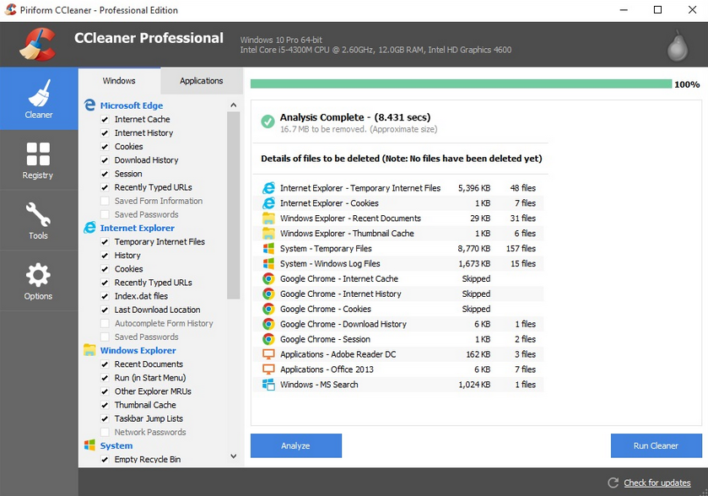
Fortunately, CCleaner can clean out a lot of those problems. No, it won’t delete term papers you no longer need (but you already did that earlier, right?), but it will get rid of cookies, temporary files, and other useless data that interferes with your operating system’s performance. Even better, it frees up hard disk space for the things you do need, makes your computer faster with less crashes and system errors, and makes browsing more secure.
CCleaner has earned its position at the top of the freeware cleaners offering the sort of features premium programs struggle to compete with, but there are also Professional, Network, Business, and Technician Editions available for serious users.
CCleaner – a powerful utility for improving your computers performance.

3. Remove/uninstall unused software
It’s not just old files and directories that can cause this type of speed issue, though. Sometimes, it’s entire programs—ones you might not have intended to install, others that you’ve forgotten about or that are no longer supported—that are chewing up space and trying to load on launch. Trying to uninstall them yourself is not only time consuming, it also might not be effective against stubborn pre-loaded apps and programs that look like they’re gone but leave behind remnants.
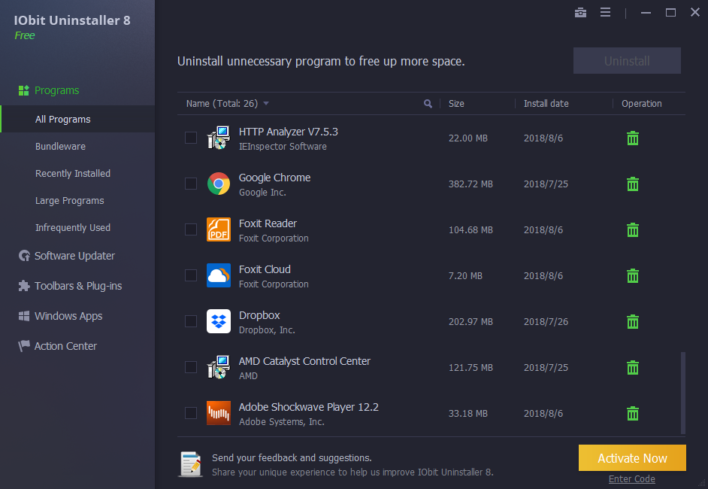
IObit Uninstaller can handle that for you. It can uninstall Windows apps, browser toolbars, software that came bundled with something you did want, useless plug-ins, and more. Its scan function will seek out the things you don’t even realize are slowing you down, while the Force Uninstall tool will completely remove unwanted programs to free up more hard disk space. As a security benefit, it strips away malicious browser add-ons, those toolbars you accidentally ended up with when you didn’t uncheck the tiny box, and more.
iObit Uninstaller Main Interface-Classic
IObit Uninstaller – An easy way to remove unwanted programs

4. Ensure your software is up to date
Outdated software can cause a multitude of issues with certain programs, including lagging and slow performance. Making sure your software and drivers are up to date can not only help to speed up a slow PC, but it is also one of the easiest ways to improve your cybersecurity (which can actually also maintain and improve system performance). Outdated software leaves you open to attack from malware, viruses and spyware, all of which can have a significant impact on your system and reduce its performance.
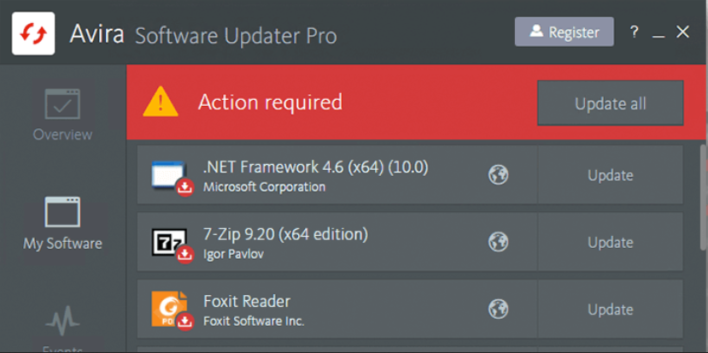
Avira Software Updater Pro makes it easy to keep on top of your software updates. With automatic software updating, you can make sure that your most important programs are always up to date, reducing performance issues or threat from cyberattacks that could slow you down.
Avira Software Updater Pro – More efficient updating.

5. Get smart with antivirus
It’s so obvious, it pretty much goes without saying: you’ve got to have a strong antivirus software installed and maintained. Viruses, Trojans, malware, and other malicious things can not only leave you vulnerable to more serious harm, but they can slow down your system. In other bad news, you could have “caught” one of these infections from a quick stumble onto the wrong website, through a company WiFi connection after a co-worker downloaded racy pics of a celeb, etc.
But now the good news: there are some incredible antivirus titles on the market with amazing prices, multi-device coverage, and bonus tools like geofencing and parental controls, anti-theft locking, and more.
And get this, some antivirus software even comes bundled with optimization features that increase the performance of your device or computer.
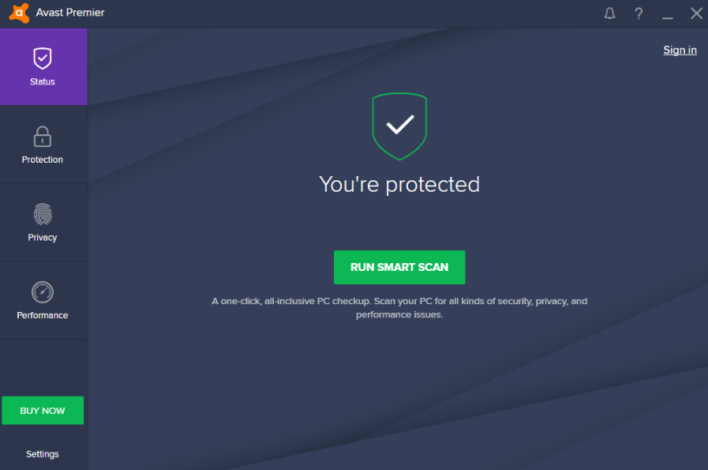
Avast Premier is one of those awesome antivirus bundles, and it comes with everything from spam fighting, to zero-second (yes, second…not day) protection, to browser clean-up, to its very own automatic software updater. What else could you possibly need?
Avast Premier Antivirus – Improve your system performance, privacy and protection with one powerful tool.

Final thoughts
There’s absolutely no need to waste your money on a new laptop until you’ve exhausted some of the basic speed bumps.
You’re just a download away from enhancing your system and resolving speed issues. If it turns out to be something more involved, like a need for additional components such as RAM, there is plenty of information—even for the novice user—online to help get you back up to speed.